Chapter 1: Number Systems — How Computers Count
Every program you have ever written, from a tiny calculator to a full shopping website, finally becomes a long row of zeros and ones. That sounds strange at first, because we humans happily count with ten digits. In this chapter we will see why computers prefer two digits, how to move between different number systems, and why 0.1 + 0.2 in Python does not give exactly 0.3. Once these ideas click, error messages, colour codes, file permissions and memory sizes all start to make sense.
Place value: the idea behind every base
Think of the number 4,725. We read it as four thousands, seven hundreds, two tens and five ones. Each position is worth ten times the position to its right. That is why our everyday system is called decimal or base 10: there are ten digits (0 to 9) and each place is a power of 10.
Nothing forces us to use ten. In binary (base 2) we only have the digits 0 and 1, and each place is worth twice the place to its right: 1, 2, 4, 8, 16, 32 and so on. The binary number 1101 means one 8, one 4, zero 2s and one 1, which adds up to 13. Computers love binary because a circuit only needs to tell the difference between two states, such as voltage on or off. Two states are easy to build reliably and cheaply, billions of times on a single chip.
Two more bases are popular with programmers because they are short-hands for binary. Octal (base 8) uses digits 0 to 7, and each octal digit stands for exactly three bits. Hexadecimal or hex (base 16) uses 0 to 9 and then the letters A to F for ten to fifteen; each hex digit stands for exactly four bits. So the long binary number 11111111 can be written neatly as FF in hex, which is 255 in decimal.
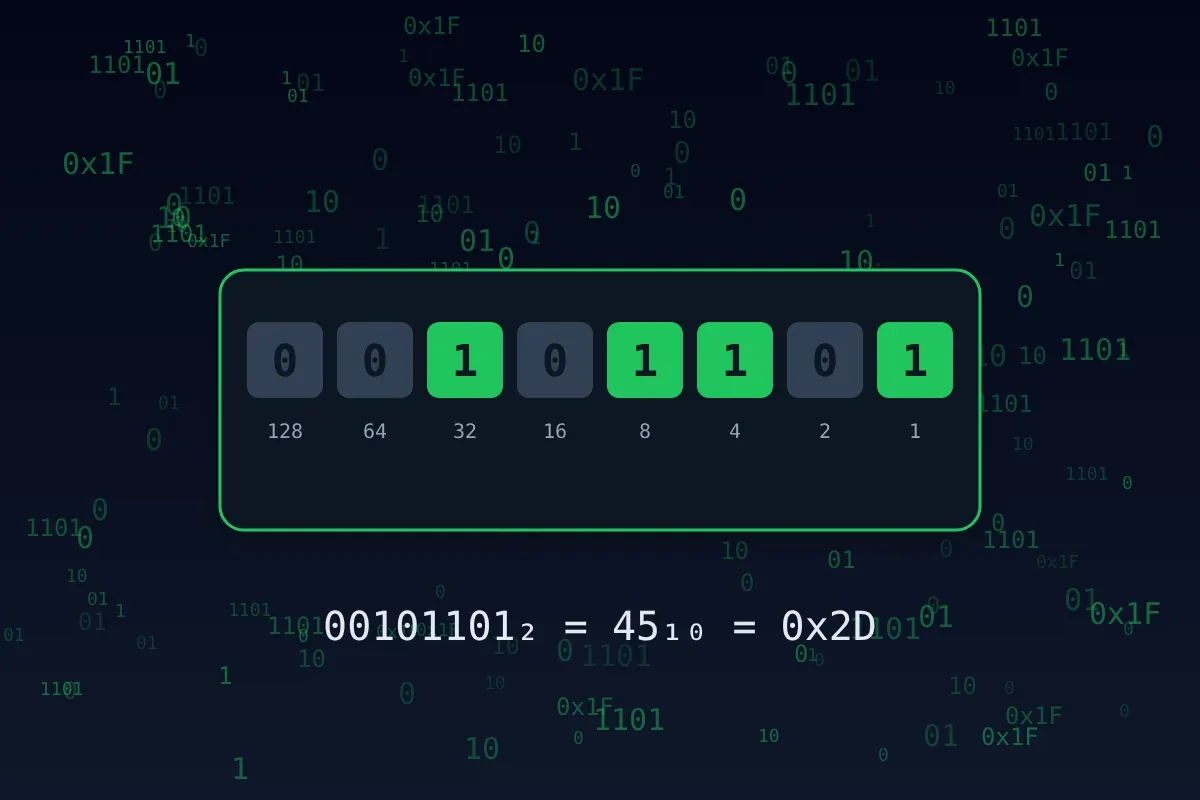
Python understands all four systems directly. You can type numbers with the prefixes 0b, 0o and 0x, and convert with built-in functions:
print(0b1101, 0o17, 0xFF)      # 13 15 255
print(bin(13), oct(8), hex(255))  # 0b1101 0o10 0xff
print(int("1101", 2))             # 13
print(int("ff", 16))              # 255
print(format(45, "08b"))          # 00101101  (8 digits, padded)
Worked example: decimal to binary by hand. To convert 45, keep dividing by 2 and write down the remainders: 45 ÷ 2 = 22 remainder 1, 22 ÷ 2 = 11 remainder 0, 11 ÷ 2 = 5 remainder 1, 5 ÷ 2 = 2 remainder 1, 2 ÷ 2 = 1 remainder 0, 1 ÷ 2 = 0 remainder 1. Now read the remainders from bottom to top: 101101. Check it: 32 + 8 + 4 + 1 = 45. The same divide-and-collect-remainders trick works for any base; divide by 16 instead to get hex.
def to_base(n, base):
    digits = "0123456789ABCDEF"
    if n == 0:
        return "0"
    out = ""
    while n > 0:
        n, r = divmod(n, base)
        out = digits[r] + out
    return out

print(to_base(45, 2))    # 101101
print(to_base(45, 16))   # 2D
print(to_base(493, 8))   # 755
You meet these bases in real life more often than you think. A web colour like #FF8800 is three hex pairs: red FF (255), green 88 (136) and blue 00 (0), giving a bright orange. On Linux servers, the permission 755 is octal: 7 is 111 (read, write, execute for the owner), and each 5 is 101 (read and execute for others).
Bits, bytes and negative numbers
A single binary digit is a bit. Eight bits make a byte. With n bits you can make 2ⁿ different patterns, so one byte gives 2⁸ = 256 patterns, enough for the numbers 0 to 255. Sixteen bits give 65,536 patterns and 32 bits give a little over four billion. This simple rule, n bits give 2ⁿ values, explains many limits you see in software, such as why an old image format may allow only 256 colours.
How does a computer store a negative number like −5 using only zeros and ones? Most machines use two's complement. For an 8-bit number, the recipe is: write +5 in binary (00000101), flip every bit (11111010) and add one (11111011). The beauty of this method is that ordinary addition just works: add the patterns for 5 and −5, ignore the carry that falls off the left end, and you get 00000000. In 8-bit two's complement, the leftmost bit acts as a sign bit, and the range is −128 to 127.
def eight_bit(n):
    return format(n & 0xFF, "08b")   # keep only the lowest 8 bits

print(eight_bit(5))    # 00000101
print(eight_bit(-5))   # 11111011
print(eight_bit(-1))   # 11111111
print(eight_bit(-128)) # 10000000
Python's own integers can grow as big as memory allows, so you rarely see overflow in pure Python. But the moment you work with files, network data, images or libraries like NumPy, fixed sizes return, and two's complement is how those bytes are read.
The floating point surprise
Try this in Python: print(0.1 + 0.2). Many beginners are shocked to see 0.30000000000000004. Python is not broken. Decimal fractions like 0.1 cannot be written exactly in binary, just as 1/3 cannot be written exactly in decimal (0.3333… goes on forever). The computer stores the nearest binary value it can fit in 64 bits, and tiny rounding errors appear when you add such values.
import math
from decimal import Decimal

print(0.1 + 0.2)                      # 0.30000000000000004
print(0.1 + 0.2 == 0.3)               # False
print(math.isclose(0.1 + 0.2, 0.3))   # True
print(Decimal("0.1") + Decimal("0.2")) # 0.3

# For money, count in paise (whole numbers) instead of rupees
price_paise = 1999 + 2501
print(price_paise / 100)              # 45.0
Never compare floats with == . Compare them with a small tolerance, or avoid floats altogether when every paisa matters.
— A rule worth remembering
Three practical habits follow from this. Use math.isclose() when comparing floating point results. Use the decimal module, or store money as whole paise, for financial calculations. And when printing results for people, round them with an f-string such as f"{total:.2f}" so the tiny error never shows on a bill.
Practice problems
- Convert 45 into binary by hand, then check with
bin(). - What is the decimal value of the binary number
11110000? - Write the hex number
0x2Ain decimal. - What is −1 in 8-bit two's complement?
- How many different values can 16 bits represent?
- Why does
0.1 + 0.2 == 0.3give False in Python?
Answers
101101(32 + 8 + 4 + 1).- 240 (128 + 64 + 32 + 16).
- 42 (2 × 16 + 10).
11111111.- 2¹⁶ = 65,536.
- Because 0.1 and 0.2 have no exact binary form, so the stored values carry tiny rounding errors that add up.