Chapter 2: Values, Variables and Types
A program is only interesting when it can remember things: a price, a player's name, a train number, whether a ticket is confirmed or still on the waiting list. In Python we remember things using variables, and every value we store has a type that decides what we can do with it. This chapter gives you the vocabulary you will use in every program you ever write.
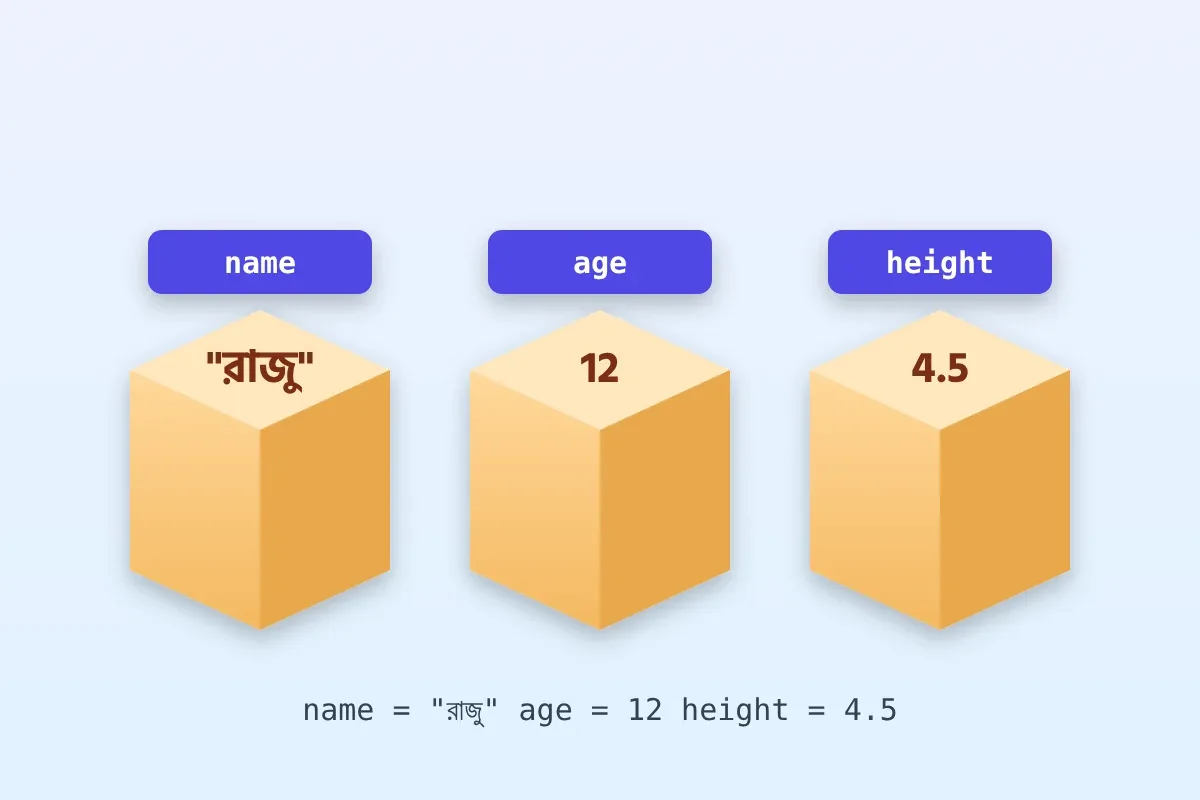
Variables: names for values
You create a variable by writing a name, an equals sign and a value. The equals sign here does not mean 'is equal to' as in mathematics; it means 'store the value on the right under the name on the left'. You can change the stored value later, which is why it is called a variable.
mango_price = 120          # rupees per kg
quantity = 2.5             # kg
shop_name = "Ramesh Fruit Stall"
is_open = True

total = mango_price * quantity
print(shop_name, "is open:", is_open)
print("Total bill:", total)

# Variables can be updated
mango_price = 110          # end-of-day discount
print("New price:", mango_price)Output:Ramesh Fruit Stall is open: TrueTotal bill: 300.0New price: 110
Notice that total was calculated using the old price of 120. Changing mango_price afterwards does not go back and recompute total; Python works line by line, in order.
A few rules for names: they may contain letters, digits and underscores, they cannot start with a digit, and they are case-sensitive, so Price and price are different. Python programmers use snake_case: lowercase words joined by underscores, such as ticket_fare or runs_scored. Choose names that describe the meaning. fare is better than f, and fare_per_km is better still.
The four basic types
- int — whole numbers:
42,-7,1000000. Use them for counts such as runs, seats or students. - float — numbers with a decimal point:
99.5,2.75. Use them for measurements such as kilograms or kilometres. - str — text inside quotes, single or double:
'Kolkata',"12345 Express". - bool — only two values,
TrueandFalse, used for yes-or-no facts.
The built-in function type() tells you the type of any value. Try type(120), type(2.5), type("hello") and type(True) in the REPL; you will see int, float, str and bool. The arithmetic operators are + - * /, plus // for whole-number division, % for the remainder and ** for power. Note that / always gives a float: 10 / 2 is 5.0, while 10 // 3 is 3 and 10 % 3 is 1.
biscuits = 50
children = 8
print("Each child gets", biscuits // children, "biscuits")
print("Left over:", biscuits % children)
print("Exact share:", biscuits / children)
print("2 to the power 10 is", 2 ** 10)
This prints Each child gets 6 biscuits, Left over: 2, Exact share: 6.25 and 2 to the power 10 is 1024. The pair of // and % turns up surprisingly often, for example when converting minutes into hours and minutes.
f-strings: the easy way to build text
Joining text with commas works, but it gives you little control. An f-string is a string with the letter f before the opening quote. Inside it, anything in curly braces is replaced by its value. You can also format numbers: :.2f shows two decimal places, and :, adds thousands separators.
passenger = "Anita"
train = "Shatabdi"
fare = 1245.5
seat = 34

print(f"Passenger {passenger}, seat {seat} on the {train}.")
print(f"Fare: Rs {fare:.2f}")
print(f"Fare for 3 people: Rs {fare * 3:,.2f}")Output:Passenger Anita, seat 34 on the Shatabdi.Fare: Rs 1245.50Fare for 3 people: Rs 3,736.50
f-strings are the modern, readable way to produce messages, receipts and reports, and we will use them throughout the book.
Getting input and converting types
The input() function shows a prompt, waits for the user to type something and press Enter, and returns what they typed. Here is the important catch: input() always returns a string, even if the user types digits. The string "5" is not the number 5. If you try "5" + 2 you get a TypeError, and "5" * 2 gives "55", which is rarely what you want.
To fix this, convert the value using int(), float() or str(). Converting a number back to a string is useful when you want to join it to other text or count its digits.
name = input("Your name: ")
kg = float(input("How many kg of mangoes? "))
price_per_kg = 120

bill = kg * price_per_kg
print(f"Thank you, {name}. Your bill is Rs {bill:.2f}")

pin = 700001
print("Your PIN code has", len(str(pin)), "digits")
If the user types Rahul and 1.5, the program prints Thank you, Rahul. Your bill is Rs 180.00 followed by Your PIN code has 6 digits. If they type abc for the kilograms, float() raises a ValueError. That is fine for now; in Chapter 6 you will learn to catch such errors politely.
Useful string methods
Strings come with built-in tools called methods. You call a method with a dot after the value: text.upper(). Methods never change the original string; they return a new one. Strings can also be indexed: the first character is at position 0, and -1 means the last character. len() gives the length.
city = "  new delhi  "
clean = city.strip()            # remove spaces at both ends
print(clean.title())            # New Delhi
print(clean.upper())            # NEW DELHI
print(clean.replace("new", "old"))   # old delhi
print(len(clean))               # 9
print(clean[0], clean[-1])      # n i

station_code = "HWH"
print(station_code.lower())     # hwh
print("delhi" in clean)         # True
print(clean.startswith("new"))  # True

sentence = "mango banana guava"
print(sentence.split())         # ['mango', 'banana', 'guava']
The comments show what each line prints. strip() is especially valuable with input(), because users often type an extra space by accident. The in keyword checks whether one string appears inside another, and split() breaks a sentence into a list of words; you will learn all about lists in Chapter 4.
Know the type, and you know what you are allowed to do with the value.
— The key idea of this chapter
Try it yourself
- Ask the user for the price of one cricket ball and how many they want, then print the total with two decimal places.
- Ask for a total number of minutes and print it as hours and minutes using
//and%(for example, 135 minutes is 2 hours 15 minutes). - Ask for a person's full name, strip extra spaces, and print it in title case along with the number of characters.
- Predict, then check in the REPL:
"3" * 3,int("3") * 3andfloat("3") * 3. - Write a small receipt for two items using f-strings, with each price shown to two decimal places.